 PRING Help
Check your cash flow
The cash flow table is built by month for the next 12 months from upcoming receipts and payments in the sales, purchasing and expense apps. Update the cash flow table in its list rebuilds it on the spot, and it updates every morning when an administrator has saved the tokens. The only value people enter is the opening balance of the first month. Read the list to find negative months.
Steps
Screenshots are taken from the real PRING plugin (v6) with sample data; the surrounding kintone screen is simplified. Your kintone and plugin version may differ in details. The plugin UI is in Japanese.
1. Bring the cash flow table up to date (accounting)
The app is 資金繰り表 (Cash flow table). Press Update the cash flow table above the list; PRING reads the sales, purchasing, expense and finance apps and rebuilds it on the spot, with no token needed. When an administrator has saved the tokens under 1. Daily automatic update (optional) on the Finance tab, it is also updated automatically every morning at 04:00 (JST). Only the 期首残高 (opening balance) of the first month is entered by hand: enter the current bank balance and save. From the second month on, the previous month's closing balance is used.
2. Read the cash flow table list (accounting)
The list has one record per month with 年月 (year-month), 期首残高 (opening balance), 売上入金 (sales receipts), 仕入支払 (purchase payments), 経費支払 (expense payments), 給与 (salaries), 社会保険 (social insurance), 源泉所得税 (withholding tax) and 調整 (adjustments). Sales receipts are amounts not yet received in receivables and sales invoices, purchase payments are amounts not yet paid in payables and invoices, and expense payments are amounts not yet settled in the out-of-pocket expense list. Salaries and similar come from the payroll app, and loans, repayments and similar from the adjustments app.
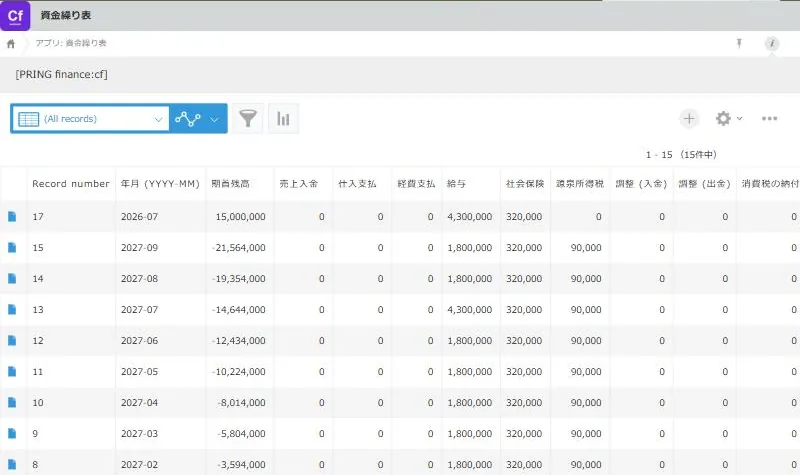
The cash flow table list. Each row is one month 3. Find months whose balance goes negative (accounting)
In the list, look for months whose opening balance and closing balance are negative. A month whose closing balance is negative shows 資金不足 (shortfall) and is listed in the 資金不足の月 (shortfall months) view. When you decide on a receipt or payment that is not in the sales, purchasing or expense apps, such as a loan or repayment, enter the date, in or out, and the amount in the adjustments app and update again.
What people do and what fills in automatically
| Step | App | What people do | What fills in automatically | If you let AI do it |
|---|---|---|---|---|
| 1 | Cash flow table | Press Update the cash flow table, enter the first month’s opening balance | Monthly receipts, payments, net and closing balance; opening balance from the second month | — |
| 2 | Cash flow table | Read the list | Figures from the sales, purchasing, expense, payroll and adjustments apps | — |
| 3 | Cash flow table, adjustments | Find the negative months, enter loans and similar in the adjustments app | 資金不足 (shortfall) on months whose closing balance is negative | — |
- The daily automatic update is not AI, so no Gemini key is needed. Months checked as fixed are not rewritten automatically.
- The figures are saved in the cash flow table app in your own kintone.
Detailed pages for each app
- Use the cash flow table: the cash flow table, payroll and adjustments apps, how amounts are counted and the update results
- Set up automatic account decisions: how to create the finance set
Related pages
Frequently asked questions
Is it connected to my bank balance?
No. The cash flow table is a forecast built from the receipt and payment dates in your kintone apps. Salaries, social insurance and withholding tax are amounts you enter; they are not calculated.
Can I correct the figures in the cash flow table by hand?
Each update overwrites them with the figures PRING writes. For a month whose figures you want to keep, check 確定 (fixed). Receipts and payments that are not in the sales, purchasing or expense apps stay after updates when entered in the adjustments app.
I cannot press Update the cash flow table.
When the cash flow table app does not exist yet, a message says it becomes available after you create the finance set under Finance in the settings screen. Ask your administrator to create the finance set.