 PRING Help
Leak detection: missing orders, invoices, payments and approvals
On the 異常・不整合チェック (anomaly check) tab of the settings screen, check the four rules (missing order, missing invoice, late payment or receipt, stuck approval) and their days, press アラートアプリを作る (create alert app), then press 今すぐ点検 (check now). Cases past the set days are recorded one by one in the PRING alert app in your kintone.
Steps
Screenshots are taken from the real PRING plugin (v6) with sample data; the surrounding kintone screen is simplified. Your kintone and plugin version may differ in details. The plugin UI is in Japanese.
1. Open the anomaly check tab
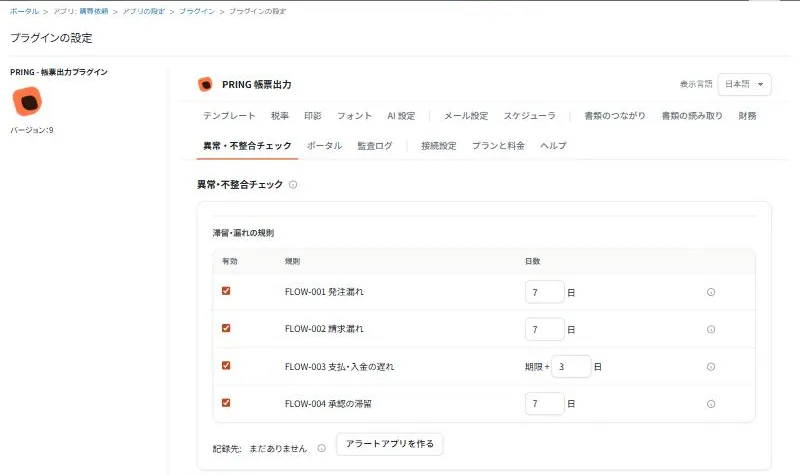
Open the PRING settings screen from any app of a business app set and choose the 異常・不整合チェック (anomaly check) tab. Four rules are listed under 滞留・漏れの規則 (rules for stuck and missing documents).
2. Check the rules and days
Tick 有効 (enabled) for the rules you use and check the days. The defaults are 7 days for a missing order, 7 days for a missing invoice, 3 days after the due date for a late payment or receipt, and 7 days for a stuck approval. Untick rules you do not use. After changing them, press 保存する (save).
3. Press create alert app
When 記録先 (record to) shows まだありません (none yet), press アラートアプリを作る (create alert app). The results of each check are recorded one by one in this kintone app.
4. Press check now
Press 今すぐ点検 (check now) to find the cases that match the rules and record them in the alert app. The result shows how many are new, continuing and resolved. The same case and rule is not recorded twice; only the days are updated. When the next document has been created or the payment or receipt is done, the status changes to 解消 (自動) (resolved automatically) at the next check, with the date and time. The alert statuses are 未確認 (unchecked), 修正済 (fixed), 理由付き続行 (continued with reason), 例外承認 (exception approved) and 解消 (自動) (resolved automatically).
The four rules
| Rule | What it finds | How the days are counted (default) |
|---|---|---|
| FLOW-001 missing order | No purchase order some days after an approved purchase approval (without contract) or contract | 7 days from the approval (without contract) or the contract |
| FLOW-002 missing invoice | No invoice (sales: sales invoice) some days after the delivery note | 7 days from the delivery note |
| FLOW-003 late payment or receipt | Payment or receipt not done in payables (sales: receivables) after the invoice due date | 3 days after the due date |
| FLOW-004 stuck approval | In an app with approvals, still waiting for approval some days after creation | 7 days from creation |
Do it by hand
- Press 今すぐ点検 (check now), open the cases recorded in the alert app, and create the next document or record the payment or receipt.
- To see the whole case, press Document links on any document’s detail screen to find the missing documents.
Related pages
Frequently asked questions
Is a purchase without a contract treated as a missing order?
It can be, but the missing contract itself is not treated as a leak. Without a contract, the days are counted from the approval of the purchase approval; with a contract, from the contract.
Are the results kept on PRING servers?
No. The results are saved one by one in the alert app in your own kintone.
Does the check run automatically every day?
Currently the check runs when you press 今すぐ点検 (check now) on the settings screen.